The Truth About the Thinkpad P15 Gen 2 2021: Pros, Cons, and Verdict
The ThinkPad P15 Gen 2 (2021) arrived as Lenovo’s answer to professionals who demand desktop-class performance in a 15-inch laptop. Marketed as a mobile workstation, it blends the familiar ThinkPad build and keyboard with components and features targeted at engineers, designers, video editors, and researchers. This article examines the P15 Gen 2 in practical terms: who it serves best, where it falls short, and what buyers should prioritize when choosing a configuration.
Introduction
Mobile workstations occupy a specific niche: they must balance raw compute power, expandability, display quality, and reliability while still being transportable. Unlike ultrabooks or gaming laptops, buyers of mobile workstations are often guided by software certifications, sustained multi-threaded performance, and long-term serviceability rather than thinness or gaming-style aesthetics. The ThinkPad P15 Gen 2 is designed for that audience. In this review, the focus is on real-world use cases—CAD, 3D rendering, simulation, data analysis, and content creation—and on what matters to buyers in those fields.
Detailed Product Review and Analysis
Design and Build
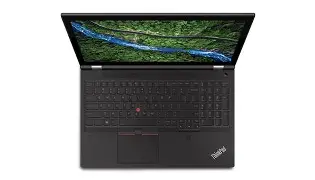
The P15 Gen 2 retains the ThinkPad DNA: a matte black chassis, spill-resistant keyboard, and a sturdy hinge. It prioritizes durability and serviceability over thinness. For professionals who travel between office, client sites, and job locations, the rugged feel and reinforced chassis are reassuring. The laptop is noticeably thicker and heavier than consumer 15-inch models; this is a deliberate compromise to accommodate workstation-grade cooling, multiple storage bays, and a larger battery.
Performance and Hardware Options
Lenovo offered the P15 Gen 2 with workstation-class CPU choices and professional GPUs. Buyers can select high-core-count Intel H-series or Xeon CPUs (with optional ECC memory support in Xeon builds), and professional NVIDIA GPUs intended for CAD and rendering workflows. These configurations provide strong single-threaded and multi-threaded performance for compiling code, running physics simulations, handling large datasets, and rendering frames. The platform typically supports multiple M.2 NVMe slots and generous RAM capacity (suitable for 32GB, 64GB, or higher), which benefits virtualization, complex CAD assemblies, and large video timelines.
Real-world testing scenarios—such as running multithreaded renders, running FEM or CFD simulations, or compiling large codebases—show the P15 Gen 2’s strengths: it can sustain heavy loads longer than thin-and-light designs due to more robust cooling and higher TDP allowances. However, the sustained performance depends on configuration and ambient temperature; thermal throttling can still occur under continuous maximum loads if the cooling is pushed to its limits.
Display and Color Accuracy
Display options typically include Full HD (1920×1080) panels and higher-resolution, color-calibrated 4K options with wide color gamut coverage. For users in content creation or color-sensitive design, the 4K HDR or high-quality IPS panels are a strong draw: they provide accurate colors, fine detail, and wide viewing angles. For engineers and designers working with precise color or high-resolution imagery, these displays remove one common bottleneck in the workflow.
Keyboard, Trackpad, and Input
The P15 Gen 2 features the classic ThinkPad keyboard, which is often cited as one of the best laptop keyboards for long typing sessions. The trackpad and the red TrackPoint remain useful for precision work or when desk space is limited. For professionals who spend long hours coding, documenting, or entering data, the comfort and feedback of the keyboard are meaningful practical advantages.
Ports and Expandability
One of the P15 Gen 2’s strengths is its array of ports: multiple USB-A, Thunderbolt/USB-C (often Thunderbolt 3), HDMI or miniDP outputs, Ethernet, and optional smart-card or SD card readers depending on configuration. Expandability and repairability were prioritized: access panels and replaceable components mean that RAM and storage upgrades are straightforward compared with many modern laptops. For IT departments and independent professionals who value long-term serviceability, that’s a big plus.
Battery Life and Mobility
Given its workstation focus, battery life is not the P15 Gen 2’s headline strength. In light to moderate tasks (office work, email, browsing), expect reasonable runtimes; under heavy GPU/CPU loads, battery life declines sharply and the system performs best when connected to AC power. The power brick is larger and heavier than ultrabook chargers, reflecting the higher power draw. For users who need full workstation performance on the go for extended periods, a compromise must be accepted: either carry the AC adapter or trade off some thermal and computational headroom for longer battery life.
Noise and Thermals
Under heavy load, fans become audible. The cooling system can keep components at safe operating temperatures, but acoustics reflect that thermal headroom is being used. In quieter office environments or client meetings, fan noise may be noticeable during intensive tasks. Thermal performance is generally acceptable for its class, but buyers who prioritize whisper-quiet operation will find the P15 Gen 2 less ideal unless configured with conservative power settings.
Looking for the best Electronics deals on Amazon?
Shop Amazon →Security, Certifications, and Support
The ThinkPad line includes business-focused security features—TPM, optional IR camera for Windows Hello, fingerprint readers, and enterprise-focused manageability options. For industries that rely on ISV (Independent Software Vendor) certification—common in CAD, CAE, and media workflows—the P15 Gen 2 often appears on certified workstation lists, meaning it has been tested by software vendors for compatibility and stability. Commercial buyers may also value Lenovo’s on-site repair and extended warranty options for minimizing downtime in professional environments.
Pros & Cons
- Pros:
- High sustained performance for CPU- and GPU-heavy professional workloads
- Workstation-grade configuration options, including Xeon and professional GPUs
- Excellent keyboard and comfortable input for long sessions
- Robust build quality and enterprise-grade security features
- Good display options with color-accurate 4K panels suitable for creative work
- Expandability and serviceability—RAM and storage are user-accessible
- Wide port selection suitable for docking and peripheral-heavy setups
- Cons:
- Heavy and relatively bulky compared with consumer 15-inch laptops
- Battery life is modest and drops sharply under load
- Fan noise under sustained high loads can be intrusive in quiet environments
- Higher price relative to general-purpose laptops, especially at top configurations
- Not a portable daily driver for users whose work is largely lightweight or mobile
Comparison: Where the P15 Gen 2 Fits
| Model | Target User | Strength | Relative Mobility | Serviceability |
|---|---|---|---|---|
| ThinkPad P15 Gen 2 (2021) | Engineers, 3D artists, video professionals, data scientists | Sustained workstation performance, ISV compatibility, robust build | Moderate — bulky and heavy but transportable | High — user-upgradeable RAM and storage |
| Dell Precision 15xx series | Similar professional audience | Strong performance, often comparable ISV certification | Moderate to low — similar weight profile | High — good service access, enterprise support |
| HP ZBook Fury 15 | Enterprise workstations for CAD and media | High configurability, strong workstation GPUs | Moderate — designed for desk-to-desk transport | High — modular design and service options |
Real-World Use Cases
CAD and Engineering
For CAD assemblies and mechanical design, the P15 Gen 2 offers both the GPU acceleration and CPU threading needed to handle large models and assemblies. ISV certification ensures stability with mainstream CAD packages. Buyers in this space prioritize geometric accuracy, driver stability, and thermal consistency during long modeling sessions—where the P15 Gen 2 performs well.
3D Rendering and VFX
Render engines that use CPU and GPU resources benefit from the P15 Gen 2’s high-core-count processors and professional GPUs. The ability to fit large amounts of RAM and multiple fast NVMe drives makes it suitable as a portable render workstation for artists who need to produce or preview frames away from a render farm.
Video Editing and Color Grading
Editors working with multi-layer timelines and high-resolution footage benefit from the 4K display options and GPU acceleration. Storage expandability allows fast media scratch disks and project archiving. However, for long editing sessions, users should expect to be plugged in to access maximum GPU performance without throttling and to avoid rapid battery drainage.
Data Science and Software Development
Data scientists and developers who run local training jobs, containerized environments, or virtual machines can take advantage of the P15 Gen 2’s RAM capacity and CPU performance. For machine learning workloads, the professional-class GPU can accelerate inferencing and smaller training runs, but larger scale training is best offloaded to server-class GPUs.
Buying Guide: How to Choose a P15 Gen 2 Configuration
When considering the ThinkPad P15 Gen 2, decisions should be driven by the intended workload and working habits. The following checklist helps match configuration choices to real needs.
1. Define the Primary Workload
- If the workload is GPU-accelerated (CAD viewport performance, GPU rendering, CUDA/OpenCL tasks), prioritize a stronger professional GPU option.
- If compilations, simulations, or multi-threaded rendering dominate, prioritize higher-core-count CPUs and more RAM.
- For mixed workloads, balance a capable CPU with a mid-to-high-range GPU and maximum RAM feasible.
2. Memory and ECC
More RAM directly improves responsiveness when multitasking, working with large datasets, or running virtual machines. If absolute memory correctness is required (certified professional environments), choose Xeon configurations that allow ECC memory. Otherwise, prioritize quantity (32GB–64GB and up) for heavy workloads.
3. Storage Configuration
Multiple NVMe slots enable a fast system drive, a large-capacity work/project drive, and even a scratch disk for video or large datasets. Opt for NVMe SSDs with strong sustained write performance if working with large files. Consider headroom for future upgrades.
4. Display Selection
Choose a panel based on the nature of visual work: a high-resolution, color-calibrated 4K panel benefits color-critical tasks and detailed design work. If mobility and battery life are higher priorities than absolute color fidelity, an FHD panel can extend battery life and reduce thermal load.
Shop the latest Electronics picks on Amazon.
Browse Now →5. Ports and Docking
Evaluate port needs: external monitors, Ethernet, SD cards, and USB-A devices remain common in professional setups. A workstation with Thunderbolt/USB-C support enables modern docking solutions and high-speed external storage.
6. Warranty and Support
For enterprise or mission-critical use, extended warranties and on-site service reduce downtime. Consider Lenovo’s business-class support packages if uptime is essential to workflows or deadlines.
7. Mobility Considerations
If travel is frequent, account for the weight of the laptop and power adapter. A P15 Gen 2 is transportable but not ultralight—buyers who travel daily might prefer a more portable machine and use a desktop workstation or cloud resources when heavier workloads are required.
8. Noise and Thermal Expectations
If working frequently in noise-sensitive environments (client meetings, quiet offices), be prepared for audible fan activity under load. Consider enabling quieter power profiles when appropriate, or arrange to run heavy tasks in a controlled environment.
Verdict and Conclusion
The ThinkPad P15 Gen 2 (2021) is a workhorse aimed at professionals who need reliability, serviceability, and the ability to run sustained heavy workloads away from a full desktop. It excels in areas that matter to its target buyers: expandable memory and storage, workstation-class graphics and CPUs, color-accurate display options, and enterprise-focused security and support. For CAD, rendering, media production, and compute-heavy engineering tasks, the P15 Gen 2 is a practical and dependable choice.
Its primary trade-offs are weight, battery life, and fan noise under sustained loads. These are inherent to the class rather than faults unique to this model. Buyers who prioritize thinness, ultra-long battery life, or minimal noise should consider alternatives or accept that some compromises are necessary for the level of performance and expandability the P15 Gen 2 provides.
In summary: the ThinkPad P15 Gen 2 is a solid mobile workstation for professionals whose workflows demand power, expandability, and certified reliability. When configured to match the specific workload—more RAM and storage for data-heavy tasks, a stronger GPU for visual workloads, or Xeon + ECC for mission-critical calculations—it represents a pragmatic choice that brings desktop-like capabilities into a portable chassis, with the expected trade-offs of bulk and power consumption.